Blueprint: document actions and email
blueprint.yaml is the tenant's control file for Edge Docs: it declares which document actions users see in Salesforce, when each is enabled, what each hides or shows, how documents are named, when they expire, and what the delivery emails say. This page walks through each block as you configure it.
Anatomy of a document action
Every entry in create_document_actions follows the same shape:
create_document_actions:
  - id: create_quote                       # stable action identifier
    create_label: Create Proposal          # button label in Salesforce
    doc_type: option                       # one of the nine canonical types
    doc_type_label: Proposal               # user-facing type label
    schema_version: '1.0'                  # pins the data contract
    template_version: v1.0                 # pins the template
    default_name: '{{tour_name}} - Proposal {{date}}'
    expiry_days: 30
    expiry_help: Proposal valid for 30 days from creation
    is_default: true
    is_enabled: true
    hide_sections:
      - hold_until
    enable_conditions:
      record_type: Quote
      status_not_contains: Option
    disabled_message: Available for itineraries without Option status
    email_template:
      format: html
      subject: Your proposal — {{tour_name}}
      body: *email_body                    # shared body via YAML anchor
The pieces that matter most:
default_namesupports placeholders ({{tour_name}},{{booking_reference}},{{date}}) resolved through the data transformation'scross_referencesblock.expiry_dayssets the document validity window;expiry_helpexplains it to the user creating the document.enable_conditionsgate the action on the itinerary'srecord_type, status (status_contains/status_not_contains), and channel (channel_contains). When conditions are not met the action appears disabled withdisabled_messageas the explanation — users see why, rather than wondering where the button went.schema_version/template_versionpin the contract, so you can introduceoption-2.0without touching in-flight actions.
Section visibility: the hide_sections/show_sections → _display mapping
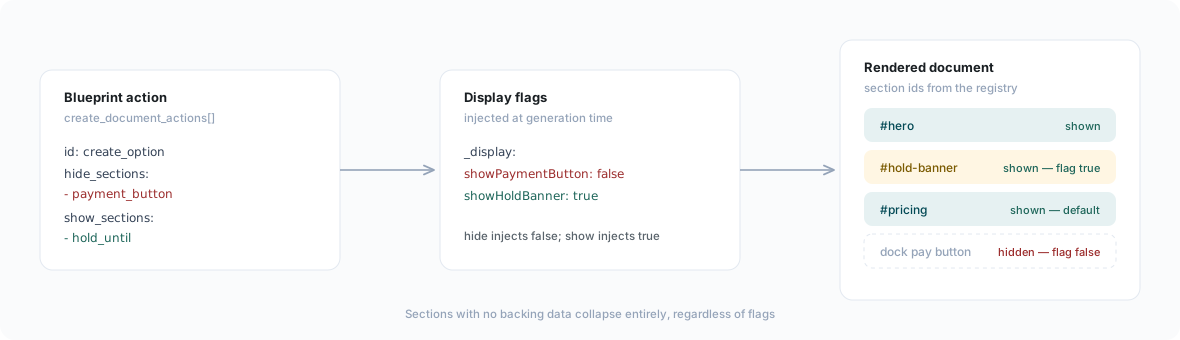
Each action's hide_sections and show_sections lists are translated into _display flags injected into the document data at generation time; templates check the flags. hide_sections injects the flag as false; show_sections injects it as true (needed for sections whose default is hidden).
| Section token | _display flag | Default when flag is absent |
|---|---|---|
hold_until | showHoldBanner | Hidden |
payment_button | showPaymentButton | Shown |
pricing | showPricing | Shown |
travel_protection | showTravelProtection | Shown |
terms | showTerms | Shown |
price_lines | showPriceLines | Hidden |
agent_banner | showAgentBanner | Hidden |
price_button | (template-level token, no flag) | — |
Sections with no backing data collapse regardless of flags. The expected flag combination per action is encoded in the tenant's QA manifest, so the test harness verifies every action's visibility set on every change.
The pricing ⊃ payment-CTA coupling
One interaction deserves explicit attention. In the proposal template, the in-page payment call to action is nested inside the pricing section — hiding pricing removes the in-page payment CTA along with the price panel. The floating action dock's pay button, however, is not inside the pricing section and is governed solely by payment_button (showPaymentButton).
Consequence: an action that hides pricing but not payment_button ships a document whose only payment affordance is the dock button — with no visible amounts anywhere. Unless that is exactly what you intend, hide payment_button alongside pricing. And because travel-protection copy ("From £x per person") and payment terms ("A deposit of £x") carry amounts too, a genuinely no-price document must hide those as well:
  - id: create_no_price_quote
    # No-price documents must not leak amounts anywhere.
    hide_sections:
      - pricing
      - price_button
      - payment_button
      - travel_protection
      - terms
The shipped actions
The baseline ships ten actions covering the full document type canon:
| Action | Document | Enabled when | Notes |
|---|---|---|---|
create_quote | Proposal | Quote, not in Option status | Default action; hides the hold banner |
create_option | Proposal | Quote, in Option status | Shows the hold banner; hides the payment button; expiry pre-filled from the option hold end date |
create_no_price_quote | Proposal | Quote, not in Option status | Hides every amount-bearing section (see above) |
create_agent_proposal | Proposal | Travel Agent channels | Trade variant; shows price lines and the agent banner |
create_final_docs | Travel Documents | Booking, status Booking Confirmed | 365-day expiry |
create_invoice | Invoice | Booking — no channel gate | Invoices are offered on every channel by design |
create_commission_invoice | Commission Invoice | Booking, Travel Agent channels | Trade-gated |
create_commission_statement | Commission Statement | Travel Agent channels | Trade-gated, pro-forma |
create_cancel_invoice | Cancellation Invoice | Booking, status Cancelled | Shipped disabled |
create_supporting_document | Certificate | Booking | Shipped disabled — regulatory slot |
Structured-disabled capability
Capability you are not using yet ships as real YAML with is_enabled: false — never as commented-out configuration. A disabled action is visible to tooling, diffable, and carries working enable conditions and placeholder tokens, so enabling it later is a one-flag change rather than an archaeology exercise:
  - id: create_cancel_invoice
    create_label: Create Cancellation Invoice
    doc_type: cancel_invoice
    is_enabled: false                # flip when the cancellation workflow goes live
    enable_conditions:
      record_type: Booking
      status_contains: Cancelled
The regulatory certificate slot (create_supporting_document) follows the same convention, with one extra requirement: flipping is_enabled is not sufficient on its own, because the example document type has no data-transformation file. Enabling it for a real scheme also means renaming the doc_type to the scheme, replacing the schema and template with the regulator's prescribed layout, and adding a data-transformation file for the renamed type.
Auto-generated documents
Two document types are produced by platform triggers rather than user actions:
auto_generated_documents:
  enabled: true
  types:
    - doc_type: booking_confirmation
      trigger: booking_confirmed
      recipient_preference: primary_contact
      send_immediately: true
      default_name: '{{booking_reference}} - Confirmation'
    - doc_type: financial_summary
      trigger: payment_received
      recipient_preference: primary_contact
      default_name: '{{tour_name}} - Financial Summary'
The booking confirmation is generated and emailed the moment a booking is confirmed; the financial summary is regenerated whenever a payment is received, keeping the guest's statement current. Each carries its own email template with bindings such as {{recipient.name}}, {{booking.tourName}}, and {{viewerUrl}}.
Email templates
Every user-triggered action references a single shared HTML email body, defined once under a YAML anchor and reused with body: *email_body. The body is fully brand-free: every brand-specific value resolves through {{branding.*}} bindings, and every document-specific value through document bindings:
Available bindings include {{contact_name}}, {{tour_name}}, {{tour_dates}}, {{viewerUrl}}, {{expiry_date}}, and {{itinerary_owner_name}}, plus the {{branding.*}} family (logo, company name, phone, website, tagline) resolved from the blueprint's email_branding block. Rebranding email means editing email_branding — never the HTML. Per-action subject lines are the one place actions differ.
Document validity and viewer banners
The document_validity block defines per-action wording for the validity statement rendered in the document (price_validity) and the banner the viewer shows after expiry (proposal_expired):
document_validity:
  create_option:
    price_validity: >-
      The reservation is on hold until ${expiryDate}. After that date,
      pricing and availability are subject to change.
    proposal_expired:
      message: >-
        This proposal is no longer valid. Please contact your travel
        specialist at {{itinerary_owner_email}} for an updated proposal.
      contact_action: 'mailto:hello@meridiantravel.example?subject=Updated%20proposal%20request'
${expiryDate} resolves from the document's expiry parameters; {{itinerary_owner_email}} is substituted at send time. The baseline also carries a configuration slot for superseded-version wording (expired_banner_superseded_message): because every document records meta.revision and meta.supersedesDocumentId, your copy is ready for when superseded-banner selection is enabled for your tenant.
Beyond per-action banners, viewer_lifecycle defines the tenant-wide expired banner and, after a grace period (60 days in the baseline), a full-page inactive overlay with a contact call to action.
PDF settings
pdf_settings controls the print rendition: page format, margins, and — most importantly — page-break rules that keep logical units intact:
pdf_settings:
  format: A4
  margin: { top: 0.5in, right: 0.5in, bottom: 0.5in, left: 0.5in }
  inject_print_css: true
  page_break_rules:
    - selector: .itinerary__day
      action: avoid-break
    - selector: .pricing__panel, .price-lines__table
      action: avoid-break
    - selector: .accommodation-card, .stay-units__card
      action: avoid-break
avoid-break selectors target the CSS classes of the registered sections, so an itinerary day or a pricing panel is never split across a page boundary.
Related pages
- What each document type contains: Document types and Document data reference
- How templates consume the
_displayflags: Templates - Payment buttons and the payment flow: Edge Pay configuration
- Adapting the blueprint when forking: Fork playbook