How tenants work
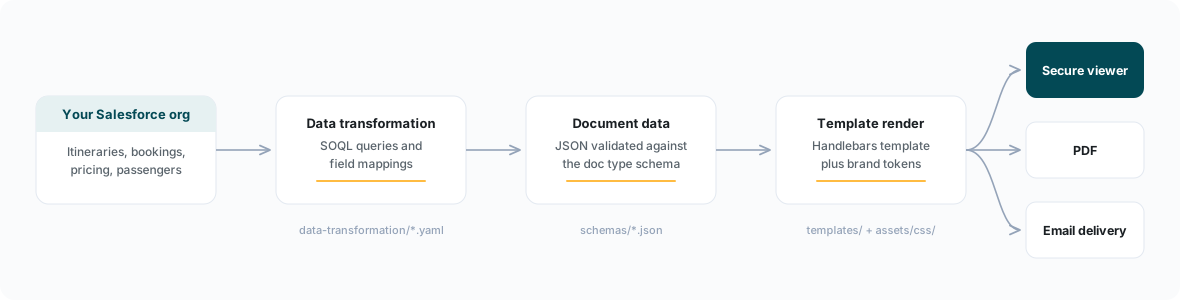
Everything about your Edge implementation — which documents exist, what they say, how they look, how payments behave — lives in a tenant configuration folder. There is no custom application code per tenant. When your configuration changes, the platform picks it up immediately; no deployment is required.
The tenant folder
A tenant is a folder of plain configuration files:
tenants/<your-tenant>/
├── blueprint.yaml            # Document actions, branding, emails, lifecycle
├── payment.yaml              # Edge Pay configuration
├── schemas/                  # JSON Schema data contracts, one per document type
│   └── option-1.0.json
├── templates/                # Handlebars HTML templates, versioned
│   └── option/v1.0/template.html
├── assets/css/               # Design tokens and stylesheet
│   ├── variables.css
│   ├── fonts.css
│   └── main.css
├── data-transformation/      # Salesforce queries → document data mappings
│   └── master.yaml
├── sample-data/              # Render-ready example datasets
└── qa-manifest.yaml          # Machine-readable test contract
Each file type has a single job:
| File | Role |
|---|---|
blueprint.yaml | Defines the document actions available to your sales team, branding, email templates, and document lifecycle rules (expiry, banners). |
payment.yaml | Defines payment methods, scenarios, eligibility rules, brand routing, and the payment page's copy and branding. |
schemas/*.json | The data contract each document type is rendered against. Documents are validated against their schema before rendering. |
templates/*.html | Handlebars templates that turn validated data into the rendered document. |
assets/css/ | A two-layer token system: brand primitives in variables.css, consumed by a semantic API that templates use. Rebranding swaps the primitive layer only. |
data-transformation/*.yaml | SOQL queries against your Salesforce org and the field mappings that shape the results into the schema. |
qa-manifest.yaml | Declares, per document type and dataset, which sections must render and which must not — enforced by the automated test harness. |
Every file in this folder is yours to edit — the document HTML, the CSS, the schemas, the queries, the copy. There are no locked regions, and teams that want direct control can manage the folder in their own repository. See Owning your configuration.
The Meridian reference baseline
New tenants are not built from scratch. Every implementation starts as a copy of the reference baseline — Meridian Travel Co., a fictional operator with a complete, render-verified configuration:
- 9 document types: proposal (
option), booking confirmation, invoice, cancellation invoice, commission invoice, commission statement, financial summary, final travel documents, and a regulatory certificate slot. - 5 itinerary variants proving the same schemas flex across escorted touring, tailor-made (FIT), cruising, and multi-brand programmes.
- A complete Edge Pay baseline with card payments enabled and every other capability present as a documented, disabled stub you switch on when needed.
- A QA contract that the automated harness enforces on every change.
The customization guide explains how the baseline is forked into your tenant.
How your Salesforce org connects
Your org is registered in the blueprint under salesforce_environments. The platform resolves which tenant a request belongs to from the Salesforce org ID — when a user opens a document action in your org, Edge looks up the org ID and loads your tenant's configuration.
salesforce_environments:
  production:
    org_id: 00Dxx0000000000XXX   # Your 18-character Salesforce Org ID
    ktapi_client_id: "Acme Travel"   # Your KTAPI client display name
    ktapi_env: production
    edge_env: production
    config_ref: main
ktapi_client_id names your KTAPI client — KTAPI is Kaptio's API layer that Edge uses to read data from your org, and the client is registered by Kaptio at onboarding. (The example uses "Acme Travel" to stand for your company's value.)
One org ID resolves to exactly one tenant. Sandbox and production orgs are registered as separate environments, which lets you point a sandbox at a feature branch of your configuration (config_ref) while production reads main.
How changes ship
Configuration changes follow a review workflow:
- Changes are made on a feature branch of the configuration repository.
- An automated validation pipeline checks YAML/JSON syntax and runs the document test harness.
- A reviewer approves and merges.
- The change is live immediately on merge — the platform's configuration cache is invalidated automatically.
Who makes the changes is up to you: Kaptio can manage the configuration on your behalf, or your team can work directly in your own repository and drive the merge requests yourselves — see Owning your configuration.
Secrets — payment gateway credentials, signing keys — are never stored in configuration files. Configuration references them as vault:: keys (for example vault::braintree_public_key); the actual values are held in the platform's encrypted vault and provisioned by Kaptio during onboarding.