Edge Docs overview
Edge Docs generates branded, customer-facing documents — proposals, confirmations, invoices, travel documents — directly from your Salesforce data. Your sales and operations teams trigger document actions from the itinerary record in Salesforce; Edge transforms the org data into a validated JSON dataset, renders it through a Handlebars template, and delivers the result as a secure online viewer link, a PDF, and an email to the recipient.
Everything that defines your documents lives in your tenant configuration folder: no per-tenant application code, no deployments when configuration changes.

How a document is produced
Every document follows the same pipeline:
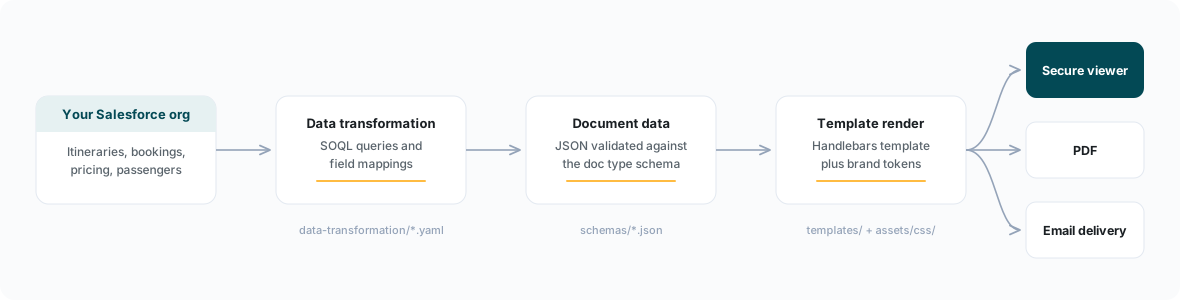
Each stage has its own page in this section:
| Stage | Configuration | Documentation |
|---|---|---|
| Which documents exist and when they are offered | blueprint.yaml | Blueprint: document actions & email |
| What data each document carries | schemas/ | Document data reference |
| How Salesforce data becomes document data | data-transformation/ | Data transformation |
| How the document looks | templates/, assets/css/ | Templates |
The full set of document types and their gating rules is described in Document types.
The document lifecycle
1. Create. A user opens an itinerary in Salesforce and sees the document actions your blueprint defines (for example "Create Proposal" or "Create Invoice"). Each action carries enable conditions — record type, itinerary status, sales channel — so only the actions that make sense for the current record are offered. Actions that do not apply are shown disabled with an explanatory message.
2. Generate. When the user runs an action, Edge executes the data transformation against the org, validates the resulting dataset against the document type's schema, and renders it through the template. The user can preview the document, and depending on your feature settings, edit content inline before sending.
3. Send. The document is delivered by email using the action's email template. The email carries a link to the online viewer; the recipient does not need a login. A PDF rendition is available for download and attachment.
4. View. The recipient opens the document in the secure viewer. Viewer links are time-limited (signed URLs with a configurable validity window). For proposal-type documents the viewer can also present a payment call to action wired to Edge Pay.
5. Expire and supersede. Every action defines an expiry_days window. After expiry, the viewer overlays a banner with per-action wording you control — for example, "This proposal is no longer valid. Please contact your travel specialist." Each document also carries a revision number and a reference to the document it replaces, giving every tenant a complete revision trail. After a configurable grace period, expired documents are replaced by a full-page overlay with a contact call to action.
Some documents are not user-triggered at all: booking confirmations and financial summaries can be generated automatically when a booking is confirmed or a payment is received. See auto-generated documents.
Delivery, viewer security, and tracking
A few platform behaviours sit around the lifecycle and are configured per tenant:
- Viewer links are signed and time-limited. Access tokens are short-lived (minutes), while the viewer URL itself is valid for a configurable number of days — independent of the document's business expiry. A guest can keep reading an unexpired document without re-authenticating; an attacker cannot replay an old link indefinitely.
- Delivery controls. Per tenant you can allow or disallow resending a document, suppressing delivery (generate without emailing), and downloading the PDF. Email opens can be tracked, and a delivery history is shown alongside each document in Salesforce.
- Inline editing. Where enabled, users can adjust document content, replace images, and toggle section visibility in a preview step before sending — within the bounds the template and display flags allow.
What you configure, what the platform provides
The split of responsibilities is consistent across every page in this section:
| You configure (tenant folder) | The platform provides |
|---|---|
Document actions, gating, expiry, naming (blueprint.yaml) | The Salesforce UI surface, generation pipeline, and trigger handling |
Data contracts (schemas/) | Schema validation on every generation |
SOQL queries and field mappings (data-transformation/) | Query execution, OAuth to your org, caching |
Templates and brand tokens (templates/, assets/css/) | The render engine, Handlebars helper registry, PDF rendering |
Email wording and branding (blueprint.yaml) | Delivery, open tracking, the secure viewer, link signing |
Configuration changes go through a merge request in the configuration repository and are live shortly after merge — no deployment step.
Design principles
The reference implementation — the Meridian reference baseline, a fictional operator covering escorted touring, tailor-made (FIT), cruising, and hybrid multi-brand programmes — encodes a set of design laws that every page in this section refers back to:
- Data and presentation are separate. Document data is plain JSON validated against a schema. Brand colours, fonts, and logos never travel in document data; they resolve from tenant configuration at render time.
- Pricing is numeric. All monetary values are numbers in an ISO 4217 currency. Formatting (symbols, separators, decimal conventions) happens at render time based on the document's locale.
- Trade data is firewalled. Commission vocabulary exists only in the commission document family. Guest documents can never leak commission figures, because the data simply is not there.
- Optional capability ships disabled, not deleted. Document actions you do not use yet (cancellation invoices, regulatory certificates) ship as real configuration with
is_enabled: false, ready to switch on.
Where to go next
- New to the tenant model? Start with How tenants work.
- Want to know which documents you get out of the box? Read Document types.
- Adapting the baseline to your brand? See the fork playbook and rebranding guide.
- Validating changes before they ship? See QA overview and the test harness.
- Collecting payments from documents? See Edge Pay.