Edge Pay overview
Edge Pay provides configurable, branded payment pages for collecting guest and agent payments against bookings in your Salesforce org. Every aspect of the payment experience — branding, payment methods, deposit rules, eligibility gates, on-page copy — is driven by a single configuration file in your tenant: payment.yaml.
There is no custom payment code per tenant. You configure; the platform renders and processes.
All examples in this section come from the Meridian Travel Co. reference implementation — the baseline your tenant is forked from. See How tenants work for the tenant model.
The payment flow
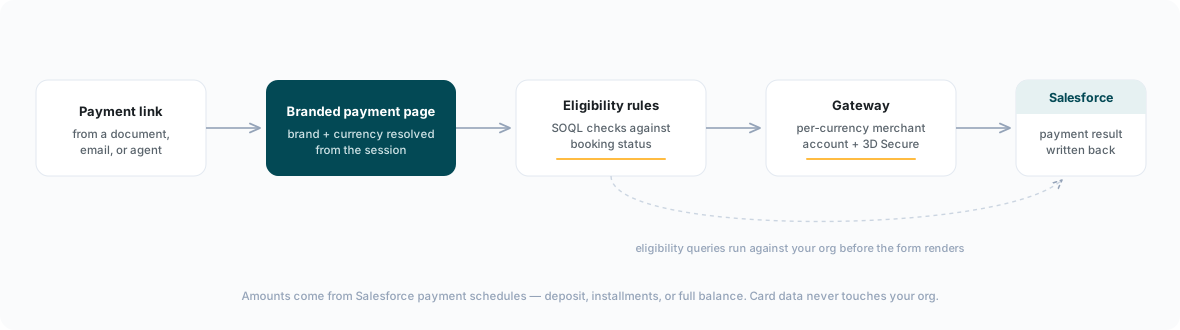
A payment moves through five stages:
- A payment link is issued. Links originate from a generated document (a proposal or confirmation rendered by Edge Docs), from an email, or directly from an agent working a booking in Salesforce or over the phone.
- The guest lands on a branded payment page. The page is rendered from your
payment.yaml: your logo, colors, fonts, and copy. In multi-brand tenants, the brand is resolved per session so each guest sees the right identity — see Brands, currencies & 3DS. - Eligibility rules are checked against Salesforce. Before any payment form is shown, configurable rules query the org in real time — for example, blocking payment unless the booking is in an eligible status. If a rule blocks, the guest sees a configurable message instead of a payment form.
- Payment is processed through the gateway. Card details are captured in hosted fields and processed through Braintree via the Kaptio Pay service, using the merchant account that matches the booking's currency, with 3D Secure applied according to your per-currency policy.
- The result is written back to Salesforce. Successful payments are recorded against the itinerary, and payment schedules are updated. Post-payment documents (such as a financial summary) can be generated on the success screen.
What you configure
| Area | Examples |
|---|---|
| Branding | Logo, color palette, fonts — aligned with your document branding |
| Payment methods | Card (with accepted card brands), PayPal, wallets, bank transfer, surcharges |
| Payment model | Deposit vs. full payment, Salesforce-driven payment schedules, auto-pay |
| Scenarios | Guest payment links, call-center (agent-assisted) payments, e-commerce, card tokenization |
| Eligibility | SOQL-backed rules that gate payment on booking state |
| Multi-brand / multi-currency | Brand routing, per-currency merchant accounts, per-currency 3D Secure |
| Copy | Every guest-visible string, from page title to validation messages |
The full field-by-field reference is in payment.yaml reference.
Entry scenarios
Payments enter the platform through configurable scenarios — each an entry point with its own rules:
| Scenario | Baseline state | What it does |
|---|---|---|
payment_link | Enabled | Secure link sent to the guest from a document or email; supports custom amounts and link expiry. |
call_center | Enabled | Agent-assisted payment; the agent selects schedule rows to pay and may vault the card for phone (MOTO) payments. |
ecommerce | Disabled stub | Web checkout integration (session + webhook), wired when an online checkout goes live. |
tokenize | Disabled stub | Zero-amount card vault for quote acceptance — saves the card without charging it. |
Amounts come from Salesforce
Edge Pay never hardcodes a deposit/full split. With deposit.from_salesforce: true (the baseline default), payment schedule rows on the itinerary in your org define the deposit, installment, and final-balance amounts and due dates. The payment page presents whatever the schedule defines — one installment or many. Eligibility rules likewise run live against the org, so the page always reflects the booking's current state.
The capability model
The baseline payment.yaml ships with every capability present in one of three states. This is deliberate: nothing is hidden, and enabling a capability is usually a one-line change rather than a structural addition.
| State | Meaning |
|---|---|
| Enabled | Active in the baseline. Works out of the box; you adjust values. |
| Disabled stub | Present in the file with enabled: false and a complete, documented structure. You flip a flag (and fill in any placeholder values) to turn it on. |
| Fork-time | The pattern is documented, but no stub ships in the baseline. Added during implementation when the capability is contracted. |
Baseline capability table
| Capability | State in baseline | Notes |
|---|---|---|
Card payments (gateway: kaptio_pay, provider: braintree) | Enabled | Sandbox-style config; credentials via vault:: references only |
| Availability check before payment | Enabled | Honoured by the viewer before payment is offered |
brands + brand_routing | Enabled | Brand resolved from URL parameter, then session field; empty default brand inherits root config |
Per-currency merchant_accounts | Enabled | One Braintree merchant account name per acquiring currency, with a DEFAULT fallback |
3D Secure per_currency | Enabled | GBP and EUR true for SCA regulation; other currencies default false |
| PayPal | Disabled stub | Present with enabled: false; enable when PayPal is contracted |
| Apple Pay | Disabled stub | Present with enabled: false; enable after Apple Pay domain verification |
| Google Pay | Disabled stub | Present with enabled: false; enable after Google Pay merchant setup |
| Bank transfer | Disabled stub | Deferred-settlement rail slot (BPay/ACH/SEPA per market) with biller reference and confirmation-email pattern |
Card surcharges (surcharge_percent) | Disabled stub | Present at 0; a first-class field on every payment method |
| Deposit vs. full-amount selection | Enabled | Deposit and final amounts driven by Salesforce payment schedules |
| Non-Braintree gateways | Fork-time | Structure documented; no stub shipped in the baseline |
When you fork the baseline, walk this table against your contract: confirm the enabled rows match your needs, flip the stubs you have contracted, and raise fork-time items with your implementation team. The fork playbook covers the sequencing.
Security posture
- Credentials never live in configuration. Gateway keys are stored in the platform's secret vault and referenced from
payment.yamlasvault::keys; the configuration repository's CI rejects literal credentials. - Card data never touches your configuration or your org. Card details are captured in gateway-hosted fields and processed by the Kaptio Pay service; Salesforce receives only the payment result.
- 3D Secure is policy-driven per currency, with currencies subject to SCA (Strong Customer Authentication) regulation — GBP and EUR — enabled in the baseline.
How Edge Pay relates to Kaptio Pay
Edge Pay and Kaptio Pay are two layers of the same payment stack, not alternatives:
| Edge Pay | Kaptio Pay | |
|---|---|---|
| What it is | The guest- and agent-facing payment experience: branded payment pages, payment links, call-center payments, eligibility rules | The platform's payment processing service: gateway integrations, merchant account routing, 3D Secure, tokenization, transaction records |
| Who configures it | You, via payment.yaml in your tenant configuration | Kaptio — provisioned and operated per environment |
| What it touches | Salesforce booking state, branding, copy, payment schedules | The payment gateway (Braintree) and card data, within PCI scope |
Every payment taken through an Edge Pay page is processed by Kaptio Pay behind the scenes. You never integrate with Kaptio Pay directly — Edge Pay is the configuration surface, and Kaptio Pay is the engine it routes to.
Where Edge Pay runs
The payment page is hosted by the Edge platform. Payment processing routes to the Kaptio Pay service for the environment configured in your tenant (development, qa, staging, or production); the specific service endpoints are provisioned and managed by Kaptio — you never configure gateway endpoints yourself. Gateway credentials are stored in the platform's secret vault and referenced from payment.yaml as vault:: keys; raw credentials never appear in configuration. See Salesforce integration for what is provisioned by Kaptio versus configured by your Salesforce administrator.
In this section
- payment.yaml reference — every configuration block, top to bottom
- Brands, currencies & 3DS — multi-brand routing, per-currency merchant accounts, 3D Secure policy
- Salesforce integration — the org-side setup, writeback, and eligibility queries