Templates
Templates are versioned Handlebars HTML files (templates/<doc_type>/<version>/template.html) that render a validated dataset into the document a guest or agent sees. One template per document type renders every variant of that type: the reference proposal template renders escorted touring, FIT, cruising, and hybrid trade documents — and all four create-action variants — from one file. Variation is expressed through data and display flags, not template forks.
Templates are fully editable HTML — there are no locked sections or reserved markup. The only contract is the section id registry below (which the QA harness asserts) and the helper registry (which constrains what Handlebars helpers exist). Everything else — structure, layout, copy, imagery — is yours to change.
The canonical section id registry
Every top-level section in a template carries a registered id. These ids are a contract: the QA harness asserts the presence or absence of each section per dataset and per action, the blueprint's section toggles map onto them, and PDF page-break rules target their CSS classes. Templates must use these exact ids:
| Document group | Section ids |
|---|---|
| Guest documents (proposal) | hero, personal-message, highlights, journey-overview, itinerary, services, flights, accommodations, stay-units, arrival-logistics, inclusions, pricing, price-lines, payment-cta, hold-banner, agent-banner, travel-protection, terms, specialist, trust-pillars, footer, action-dock |
| Finance documents (invoice family) | invoice-header, bill-to, line-items, totals, payment-schedule, agent-card, commission-summary, distribution-guard |
| Booking confirmation | confirmation-header, what-happens-next, trip-summary, financial-summary, how-to-pay |
| Final travel documents | trip-summary, travelers, service-confirmations, important-info, emergency-contacts |
Regulatory certificates (supporting_document_example) sit outside this registry — their layouts are prescribed per scheme.
The _display flag convention
Document actions control section visibility by injecting boolean flags into the dataset's _display object at generation time (see the blueprint mapping). Templates honour two guard patterns, depending on the section's default:
- Default-hidden sections (
hold-banner,agent-banner,price-lines) render only when a flag is explicitly true:
- Default-shown content sections (pricing, inclusions, terms, and so on) render unless a flag is explicitly false. Because an absent flag must mean "shown", the guard tests for explicit
falserather than truthiness:
The flags are visible in the rendered output. These are sections of the same proposal template rendered under different actions:

hold-banner — hidden by default, switched on by the option-hold action
agent-banner — hidden by default, switched on by the trade action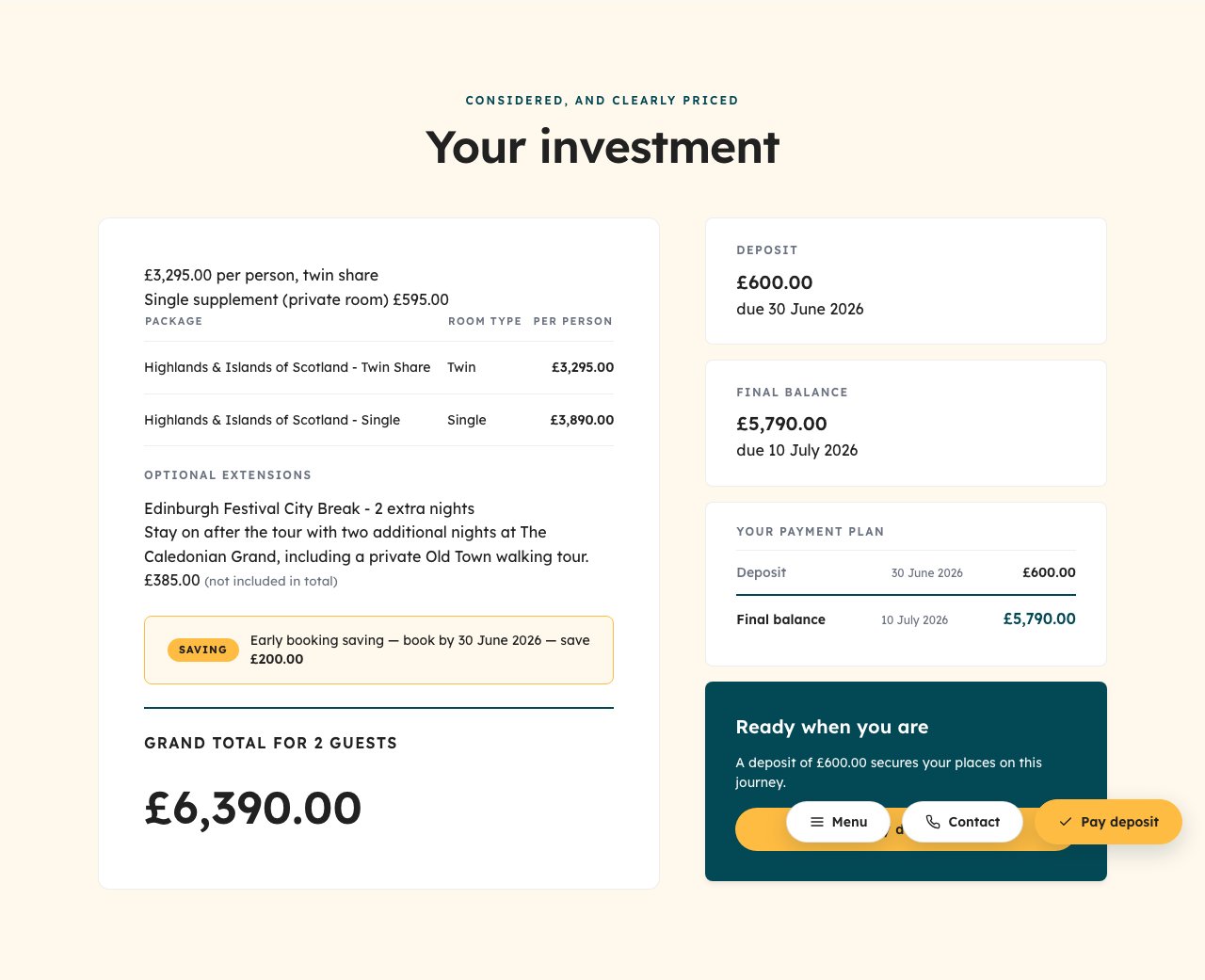
pricing on a standard proposal — package price with payment call to action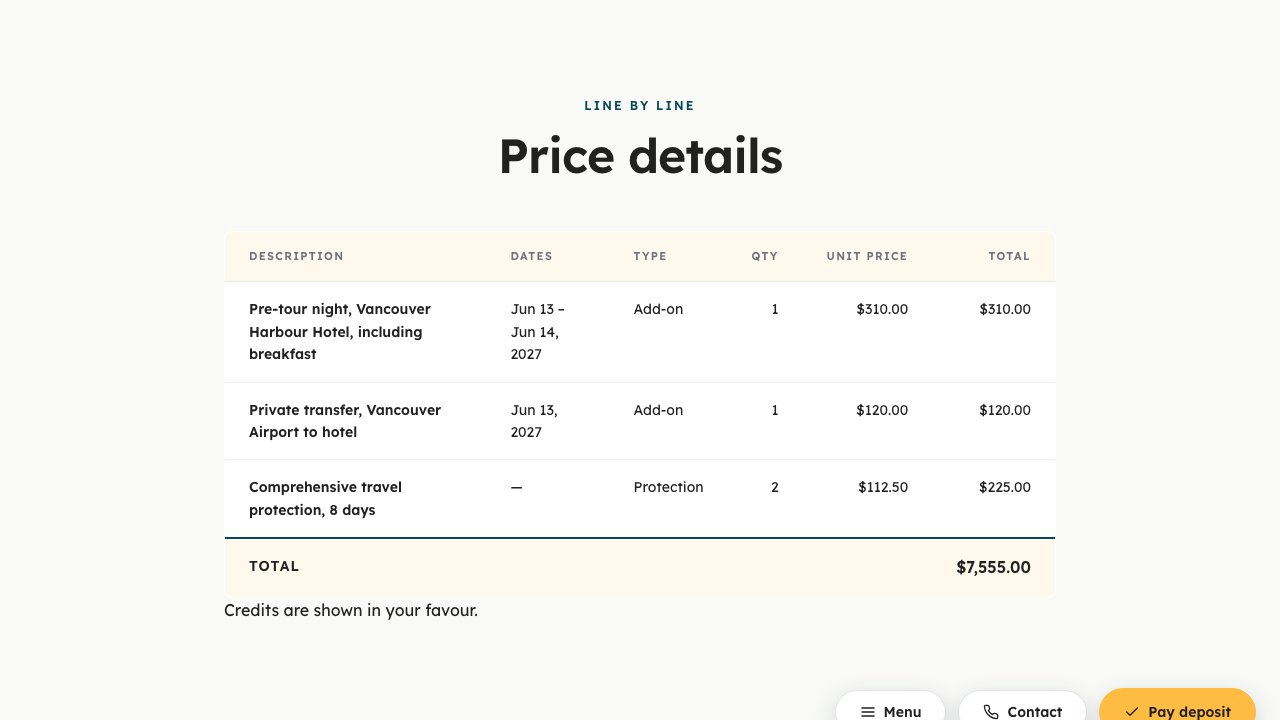
price-lines on an agent proposal — the line-level breakdown trade partners seeHere is a real default-hidden section from the reference proposal template — note the registered id, the _display guard, and the inner data guard:
Itinerary mode: which sections render
The proposal template selects its itinerary presentation from meta.itineraryMode together with data presence:
#itineraryrenders whenitinerary.days[]is non-empty and the mode is notservices— coveringdays,both, and the absent-mode fallback.#servicesrenders wheneverservices[]is non-empty. Cruise documents carry the cruise service entry alongside port-call days, so both sections can appear together.#journey-overviewrenders only when the mode isservicesandserviceDates[]is non-empty.
This is why the mode is explicit in the data rather than inferred: a hybrid document that happens to carry both arrays renders predictably, and the QA harness can assert exactly which sections appear for each dataset.
Empty-section collapse
Independently of display flags, a section with no backing data never renders — header included. The hold banner above collapses without pricing.holdUntil even when its flag is true; the pricing section renders only when the pricing object carries a renderable headline figure; an inclusions section without included or excluded items produces no output at all. This is why schema optionals are nullable by design: a sparse dataset yields a shorter document, never an empty band with a heading over nothing.
The two-layer CSS token system
Templates are styled exclusively through CSS custom properties, organised in two layers in assets/css/variables.css:
- Layer 1 — brand primitives. The raw brand values (palette, shadows). This is the only layer a rebrand replaces.
- Layer 2 — semantic API. The names templates and
main.cssactually consume. These names are identical across tenants, so templates stay brand-agnostic.
:root {
  /* Layer 1 · brand primitives */
  --flux-primary-600: #034955;
  --flux-yellow-400: #FFBC42;
  --flux-background: #F9FAF8;
  --flux-black: #212121;

  /* Layer 2 · semantic API — consumed by templates; do NOT rename */
  --color-primary: var(--flux-primary-600);
  --color-accent: var(--flux-yellow-400);
  --color-canvas: var(--flux-background);
  --color-ink: var(--flux-black);    /* inverted bands: trust pillars, footer */
  --color-text: var(--flux-black);
}
Templates never contain raw hex values; they reference Layer 2 tokens only (var(--color-accent)). When you rebrand, you replace Layer 1 values and the font definitions — every template picks up the new brand with zero template edits. See the rebranding guide.
Handlebars helpers: what templates may use
Templates may only use helpers that are available in all of the platform's render registries — the document renderer, the PDF renderer, and the QA harness all execute your template, and a helper missing from any one of them breaks that path. The QA suite includes a helper parity gate for exactly this reason.
The two patterns that matter most:
formatCurrency— the one sanctioned way to render money. Takes the raw numeric value and the ISO currency code:
- The
localeDateinline-partial pattern — locale-aware dates are implemented as inline partials declared once at the top of the template, taking the date through an explicitvaluehash argument and resolving the locale from@rootso they work at any block depth:
One constraint catches almost everyone once: there are no and / or / not helpers. A condition like "A and B" is expressed by nesting blocks:
Comparison helpers such as eq are available in subexpressions ({{#if (eq tour.departureType "Fixed")}}), which combined with nesting covers the practical cases.
Quality gates on rendered output
Every template change runs through the QA harness, which renders each dataset (and each action's display-flag set) at desktop and mobile viewports, asserts the expected and absent section ids, and scans the output for forbidden strings — undefined, [object Object], NaN, unrendered {{ braces, and invalid dates. A binding typo therefore fails CI rather than reaching a guest. Keep this in mind when adding bindings: every field a template references should exist in the schema, and every guard should tolerate null.
Locale-driven rendering
meta.locale selects more than date formats. Templates branch on it for spelling and phrasing conventions as well — for example, the reference pricing panel renders "per person, double occupancy" for en-US and "per person, twin share" otherwise. Currency formatting via formatCurrency is likewise locale-aware. The dataset never carries pre-formatted display strings for money (the one exception is tour.dates, a display date range, which the schema explicitly documents as such).
Related pages
- The data these templates bind: Document data reference
- How actions set
_displayflags: Blueprint - Selector-level expectations per section: QA test harness
- Forking and restyling templates: Fork playbook